Google Measure alternative for Android: how to measure with AR
Google's Measure app can no longer be installed from Google Play: new users lost access in June 2021, and its old store address showed no listing when we checked on November 18, 2026. To measure with AR on Android now, you need a phone that supports ARCore and another measuring app from Google Play.
What happened to Google Measure
Measure was Google's own AR measuring app for Android, built on ARCore, Google's AR platform. In June 2021 Google stopped maintaining it, and 9to5Google reported that new users could no longer download it through official means.
People who already had it could keep using it on a compatible phone. On November 18, 2026, its Google Play address (package com.google.tango.measure) showed no listing when we opened it signed out. We have not checked whether an old install still opens.
What your phone needs
AR Tape Measure, like Measure, needs a phone that supports ARCore. Google keeps the list of ARCore supported devices: a model goes on it after Google certifies its camera, motion sensors and design, and it gets ARCore through Google Play Services for AR.
Look up your model on that list before you install an AR measuring app.
What to check in a listing
- What it measures. Look in the description for length between two points, area and height.
- Units. Check that the units you work in are named, such as cm and m, or in and ft.
- Saving. Look for a way to keep a photo with the dimensions drawn on it, so there is nothing to write down.
- Ads and in-app purchases. When an app has them, Google Play shows Contains ads or In-app purchases under its name.
What each listing says
We read each app's Google Play description on November 18, 2026. The table repeats what those descriptions say; we did not test the apps.
| App on Google Play | Length between two points | Area | Height | Units named | Photo with the dimensions |
|---|---|---|---|---|---|
AR Measure Tape: SmartRuler com.lascade.measure | Mentioned | Mentioned | Mentioned | cm, m, in, ft | Unknown |
AR Ruler App: Tape Measure Cam com.grymala.aruler | Mentioned | Mentioned | Mentioned | mm, cm, m, in, ft, yd | Unknown |
AR Ruler: Tape Measure Tools com.starnest.arruler.ruler | Mentioned | Mentioned | Mentioned | mm, cm, m, in, ft, yd | Mentioned |
Tape measure Measurement ruler com.tasmanic.camtoplanfree | Mentioned | Mentioned | Mentioned | m, in, ft, yd | Unknown |
AR Tape Measure: Ruler Cam (ours) app.deepcraft.armeasure | Mentioned | Mentioned | Mentioned | mm, cm, m, in, ft, yd | Mentioned |
Mentioned means the app's Google Play description says it does this. Unknown means we did not find it in the description, which does not mean the app can't do it. Several descriptions also list features this table does not cover, such as angles, volume or floor plans.
Apps are in alphabetical order, with ours last. Names and descriptions are from the US store in English; names can differ by country, but the package name after id= in the store address is the same everywhere. Listings change, so check the current one before you install.
AR Tape Measure is our app, made by DeepCraft. We are not affiliated with Google or with the developers of the other apps.
Measuring with AR Tape Measure
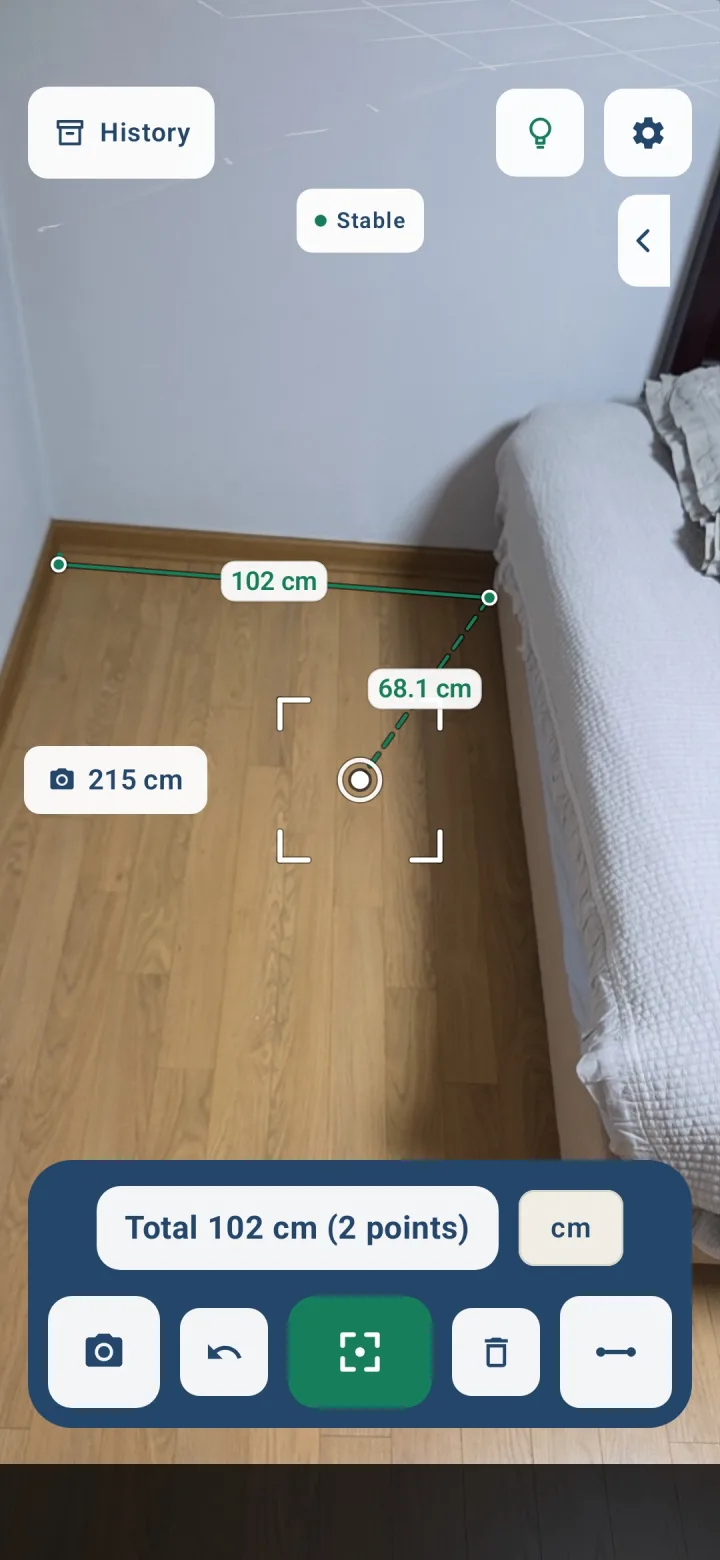
- Move the phone slowly from side to side so the app finds the floor or wall. Until it has, the green button is dimmed.
- Line up the crosshair in the middle of the screen with one end and press the green button in the middle of the bar at the bottom. The point lands where the crosshair was.
- Move the crosshair to the other end and press the green button again to get the length. Near a corner, the crosshair snaps to it.
- For a height, place one point at the bottom and one at the top in the same way.
- Press the camera button at the left end of the bar, or a volume button, to save a photo with the dimensions drawn on it.
Before you cut anything or place an order, check the final size with a tape measure.
AR Tape Measure measures length, width and height with your Android phone and saves each one as a photo.
Get it on Google Play